PRODUCT CAPABILITIES
A closer look.
A clearer answer.
Search, filter, monitor, and analyse your web server logs with a practical desktop toolkit.
A toolkit for the logs you work with.
Open supported logs
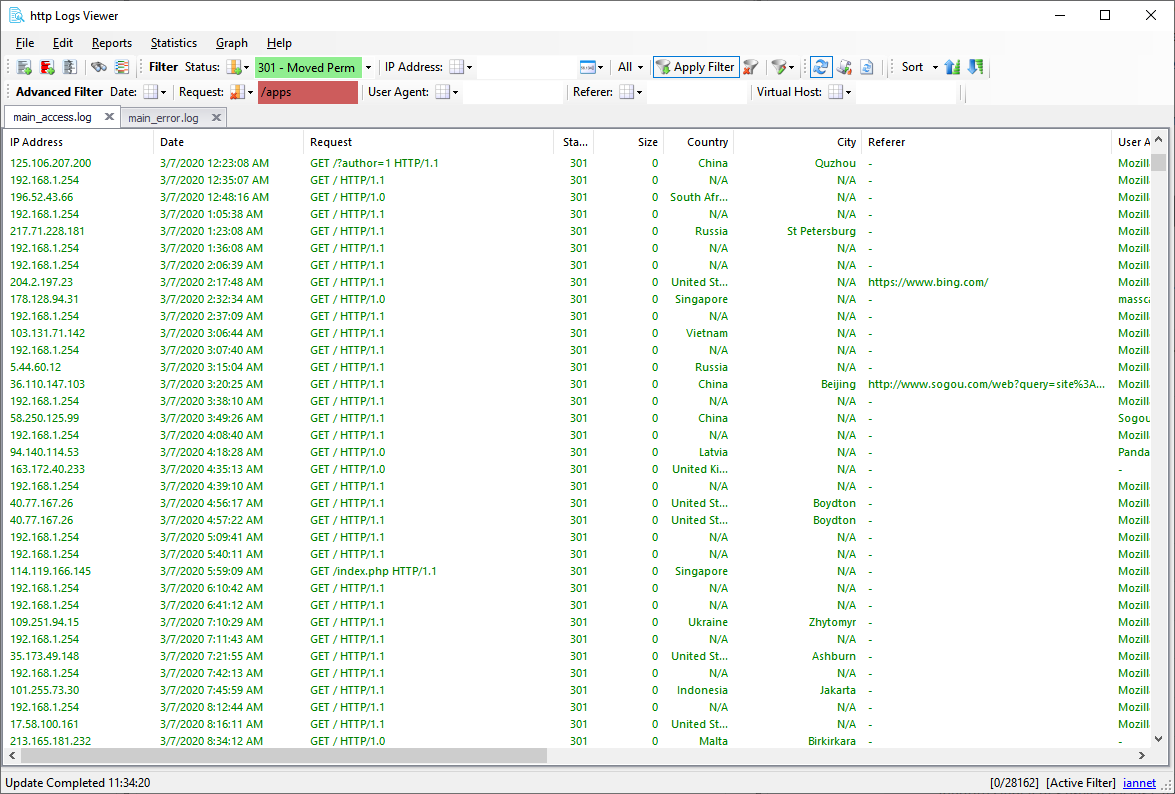
Apache Common, Combined, and custom formats; IIS NCSA/W3C logs; nginx logs; multiple files and compressed .gz archives.
Search and filter
Search requests, dates, IP addresses, referrers, and user agents. Combine include and exclude filters with regex matching.
Monitor activity
Automatically refresh local files or open remote logs over FTP/SFTP to investigate new requests.
Generate reports
Explore traffic, browsers, countries, requests, errors, and bandwidth with over 75 predefined reports.
Find useful statistics
Review top requests, IP addresses, countries, referrers, bots, 404 URLs, and other statistics.
Map and export
Add country information to IP addresses, split large logs, and export text, CSV, HTML, or log files.
Built for hands-on investigation.
Some reports, statistics, and advanced filtering require an unlock code. View licence details.
The complete feature list.
http Logs Viewer (formerly Apache Logs Viewer) comes packed with a variety of features enabling you to dive into the log file and extract data quickly. Log files are rich in data waiting to be consumed giving you unique power to enhance your website. The below is a list of some of the main features available in Apache Log Viewer.
• Supports Common/Combined/Custom and additional Apache/nginx logs.
• Supports NCSA/W3C IIS logs
• Handles multiple logs
• Supports compressed .gz logs
• Supports IPv4 & IPv6
• Split logs functionality by size/date
• Monitor logs in realtime (with automatic refresh) both local and remote via FTP/SFTP
• Highlight requests by status code
• Converts IP & IPv6 to Country
• Search by any combination of Request, Date, IP, Referrer and UserAgent
• Filter by any combination of Status/IP Address, GET, HEAD, POST Requests, Date, Referrer or User-agent
• Export to text file (txt), comma separated value (csv), log file or html
• Various Graphical Reports (Pie/Bar/Line/StackedBar) (see below)
• Various Statistics (see below)
You can view some screenshots from here.
Some of the Reports: (Pie/Bar/Line Graph)
• User Agents [ View Sample ]
• Hits each Day
• Visits by Country [ View Sample ]
• Visits by IP *
• Visits by Request *
• Visits by Referrer *
• Visits from Country * [ View Sample ]
• Visits by User Agent (Browser) *
• Unique Hits *
• Bot Hits *
• Hits per hour (from IP/for Request)*
• Request Analysis *
• Traffic Sources *
• Geo Country Visits [ View Sample ]
• Search Visits
• Spider Visits
• Bandwidth *
• Operating System *
• Status Code (per day or global) *
• and many more…
![[ View Sample ]](https://www.apacheviewer.com/images/geovisits.png)
View some of the samples Reports
* Report is available with a valid Unlock Code
Statistics:
• Total Hits (by days)
• Status Codes (by days)
• Bandwidth (by days)
• Top IP Addresses *
• Top Requests *
• Top Countries *
• Top 404 URLs *
• Top Referers *
• Top User Agents *
• Bot IP Addresses *
• Country IP Addresses *
• File Types *
• Referrer Visits *
• Referrer Hotlinking *
• Search Terms *
• Visits Count *
* Statistics is available with a valid Unlock Code
Need a sample log file to test ALV? Download one from here.
Other Logs
If your log format is not supported or you need help parsing it then contact us and send us a sample of the log file. If the syntax is valid we will do our best to supply the correct format and load the log.
This product includes GeoLite data created by MaxMind, available from http://www.maxmind.com
There’s a story
in every log file.
Start exploring yours with http Logs Viewer.
http Logs Viewer
Understand your server logs.
Built by iannet in Malta.
Product
Learn
Support
© 2026 iannet. All rights reserved. Formerly Apache Logs Viewer.